 Menus
Menus View in Figma
Overview
This page provides an in-depth look at the two types of menus used in our design system: the kebab menu and the filter menu. These menus enhance user interaction by offering streamlined access to various functions and data sorting options.
Anatomy
Filter Menu
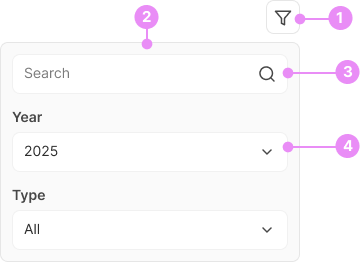
- Icon Button: The icon button features a filter icon.
- Dropdown Menu: Upon clicking the icon button, a dropdown menu appears.
- Search Filter: A filter to search.
- Other Filters: Various selectable filters within the dropdown menu.
Kebab Menu
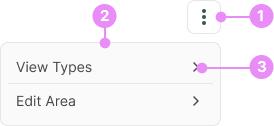
- Icon Button: The icon button features a kebab icon.
- Dropdown Menu: Upon clicking the icon button, a dropdown menu appears.
- Dropdown Menu Links: Links within the menu.
Types
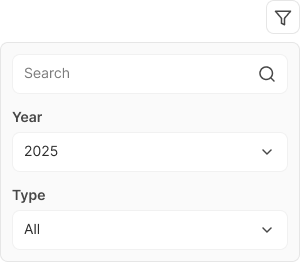
Filter Menu
Info: The filter menu includes a list of filters that update the associated table. It contains fields such as as search form, year select and type select.
View Code
Bitbucket Repo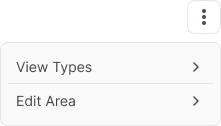
Kebab Menu
Info: The kebab menu contains a list of links for various actions, such as viewing types and editing areas.
View Code
Bitbucket RepoAccessibility
- Keyboard Navigation: Ensure all menu items can be accessed and activated using keyboard controls.
- Screen Reader Compatibility: Provide accessible labels for icon buttons and ensure dropdown menus are structured for easy understanding by screen readers.
- Focus Management: Maintain clear focus indicators and logical focus order when navigating through menu items.
- ARIA Attributes: Use appropriate ARIA roles and properties to convey the state and structure of the menus to assistive technologies.